Friday, March 19, 2010


Tuesday, March 2, 2010
Video Cameras
The features of low-cost video cameras are remarkable. We recommend every server room use a video camera. The addition of a video image to server room monitoring gives an added dimension. If an alarm is sent, a quick look at a Web Browser tells you if the lights are on and who is in the room, something you would only have found about by driving over to the room.
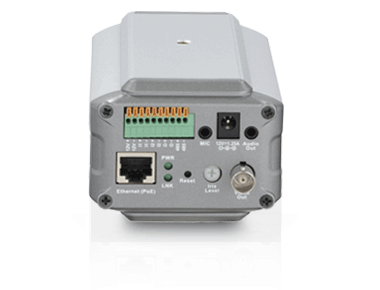
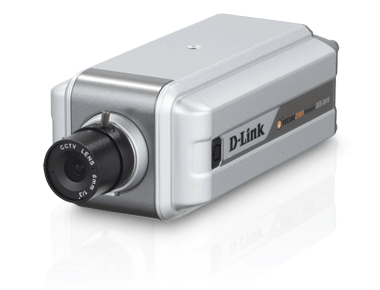
We recommend and support the D-Link DCS-3410. The D-Link® DCS-3410 Fixed Network Camera is a versatile monitoring solution for installations that require the ability to record in low-light situations. The low lux enables you to record anytime, day or night, with minimal lighting. Along with the additional options available including features such as simultaneous MPEG-4 & MJPEG streaming, a BNC connector, digital I/O ports, PoE support, and support for optional low light accessories, the DCS-3410 provides the versatility needed for professional surveillance applications. The camera produces superb pictures, and is supported by the ITWatchDogs climate monitor and Console software.
The D-Link camera also offers motion detection with e-mail alerts, making it very useful; if something moves, you’ll soon know what or who it was.
Once installed, you can get an e-mail if the camera detects motion in the server room. The D-Link cameras available on our site can detect motion as well. Excellent still and motion pictures plus motion detections with e-mail alarms. The threshold of detection can easily be adjusted.
The cost of one trip to visit a remote server room is well worth the price of these cameras. Price of D-Link 3410 is $350 on www.itwatchdogs.com
Images:

We recommend and support the D-Link DCS-3410. The D-Link® DCS-3410 Fixed Network Camera is a versatile monitoring solution for installations that require the ability to record in low-light situations. The low lux enables you to record anytime, day or night, with minimal lighting. Along with the additional options available including features such as simultaneous MPEG-4 & MJPEG streaming, a BNC connector, digital I/O ports, PoE support, and support for optional low light accessories, the DCS-3410 provides the versatility needed for professional surveillance applications. The camera produces superb pictures, and is supported by the ITWatchDogs climate monitor and Console software.
The D-Link camera also offers motion detection with e-mail alerts, making it very useful; if something moves, you’ll soon know what or who it was.
Once installed, you can get an e-mail if the camera detects motion in the server room. The D-Link cameras available on our site can detect motion as well. Excellent still and motion pictures plus motion detections with e-mail alarms. The threshold of detection can easily be adjusted.
The cost of one trip to visit a remote server room is well worth the price of these cameras. Price of D-Link 3410 is $350 on www.itwatchdogs.com
Images:
How Our Analog Water Sensor Works
Most water sensors measure the difference between the conductivity of air and the conductivity of water. ITWatchDogs water sensors have a low voltage applied to four metal brads on a plastic case. When the water touches the brads, it completes the circuit and the current begins to flow. IF the metal brads are touching a surface such as a concrete floor, the graphs will show a decrease from reading 99 (dry, no current flow) to 80 (damp) to 55 (full conductivity).
The water sensors plug into the analog-sensor ports in ITW products
When installing the water sensor, be sure that the surface the sensor is placed upon is non-conductive. Since the sensor detercts water by electrical conductivity between the metal brads, if those brads are in contact with a conductive surface - such as a metal tray - the sensor will always show full conductivity, wet or dry.

The water sensors plug into the analog-sensor ports in ITW products
When installing the water sensor, be sure that the surface the sensor is placed upon is non-conductive. Since the sensor detercts water by electrical conductivity between the metal brads, if those brads are in contact with a conductive surface - such as a metal tray - the sensor will always show full conductivity, wet or dry.
- The sensor must face down - metal brads against the floor
- Placement locations:
- water collection trays such as the trays below sprinklers.
- Lowest point on the floor or below raised flooring. To find the lowest place on floor, spill some water and see where it puddles in your server room - that's a perfect place for a water sensor.
- Below a water pipe junction
- In back-up air-conditioning condensation trays.
- Test the sensor. Dunk it in a glass of water and see if you get an alarm. Wipe it off, then place it on a wet napkin to note the reading.
- Make sure the sensor is installed on an insulated surface. If the sensor is to be placed on a metal surface, such as inside an a/c's condensation tray, place a vinyl floor tile under the sensor, in between the sensor and the metal.

Graphing Key Elements
Any variable such as temperature and humidity tells a more valuable story with information graphed over time. It is important to note the trends in those measurements, as that's what tells you what is happening in your server room. When you see a trend over time you are able to look closely to what is causing that trend and try to fix the problem before it causes any type of failure.
All ITWatchDogs devices produce graphs of measurements. A sample can be seen at one of our product demos at itwatchdogs.com or you can simply go to http://67.79.205.81/
Backup Air Conditions
From a peace-of-mind perspective, the most secure method of preventing a server room meltdown is to have a backup air-conditioning system that is separate from the primary system.
Whether a stand-alone portable unit or a duplicate in-ceiling machine, this is a practical way to keep equipment in operation while the primary air conditioner is being repaired.
Now, if you're away for the weekend and your primary a/c goes out, what can you do? Two things that come to mind: either have someone available to go and turn on back-up a/c while they repair primary a/c as soon as you receive an alert OR automate the process so as soon as the temperature rises, the temperature sensor alerts your climate monitor, which then sends out an alert to you (or specified admins) and automatically turns on your backup a/c via output relay control. Both solutions are possible with ITWatchDogs climate monitors. You may use any of our devices to get alerts and monitor your systems via the internet. However, our RelayGoose II can be used to control external processes e.g. turning on your back-up a/c when an alarm goes off - you can program as many alarms you can think of with our system.
If you have questions, feel free to email sales@itwatchdogs.com
Whether a stand-alone portable unit or a duplicate in-ceiling machine, this is a practical way to keep equipment in operation while the primary air conditioner is being repaired.
Now, if you're away for the weekend and your primary a/c goes out, what can you do? Two things that come to mind: either have someone available to go and turn on back-up a/c while they repair primary a/c as soon as you receive an alert OR automate the process so as soon as the temperature rises, the temperature sensor alerts your climate monitor, which then sends out an alert to you (or specified admins) and automatically turns on your backup a/c via output relay control. Both solutions are possible with ITWatchDogs climate monitors. You may use any of our devices to get alerts and monitor your systems via the internet. However, our RelayGoose II can be used to control external processes e.g. turning on your back-up a/c when an alarm goes off - you can program as many alarms you can think of with our system.
If you have questions, feel free to email sales@itwatchdogs.com
Tuesday, February 2, 2010
Hot Spots, Temperature Variations
When the thermostat on the wall reads 72 degF, the natural tendency of most people is to assume this means that the room is 72 degF everywhere. But of course, this simply isn't the case; temperatures can vary by 10 degrees or more in a room, and variations of 20 degF inside server cabinets are common. It is good practice to check different areas of the room and monitor your server room's temperature with several sensors at multiple locations - otherwise, equipment on one side of the room might be running hot while equipment on the other side is well within normal limits, and you might never know until it's too late.
How UPS Helps Cook Gear
Ironically, a UPS unit can help fry your equipment. While a UPS can keep the server equipment running when main power fails, it doesn't keep the air conditioners going.
While keeping the equipment running during a power failure may make the users happy, it also means that the gear will keep making tons of heat. In as little as two or three hours, the equipment could fry itself into scrap.
If main power fails for more than a few minutes, the safest thing for the server room equipment would be to shut each down until the air conditioning is restored. The servers should be gracefully shut down; programs exited, files closed, and the machines powered off. While an hour or two without service may frustrate your users, just imagine how much worse it will be if your system is off-line for days or weeks because you had to re-build the entire server room after the equipment cooks itself...
Of course, to be able to shut the servers down at the right time, you would need to know that the a/c isn't working - for that ITWatchDogs provides low cost and easy to use power and climate monitors that alert you when temp falls above/below a certain level or in event of power failure. Check out www.itwatchdogs.com for details or contact sales@itwatchdogs.com with your questions to see what product is right for you.
While keeping the equipment running during a power failure may make the users happy, it also means that the gear will keep making tons of heat. In as little as two or three hours, the equipment could fry itself into scrap.
If main power fails for more than a few minutes, the safest thing for the server room equipment would be to shut each down until the air conditioning is restored. The servers should be gracefully shut down; programs exited, files closed, and the machines powered off. While an hour or two without service may frustrate your users, just imagine how much worse it will be if your system is off-line for days or weeks because you had to re-build the entire server room after the equipment cooks itself...
Of course, to be able to shut the servers down at the right time, you would need to know that the a/c isn't working - for that ITWatchDogs provides low cost and easy to use power and climate monitors that alert you when temp falls above/below a certain level or in event of power failure. Check out www.itwatchdogs.com for details or contact sales@itwatchdogs.com with your questions to see what product is right for you.
Subscribe to:
Posts (Atom)

